Tmux is a terminal multiplexer. But every terminal into Tmux is pseudo-terminal.
Basic conceptions
All configuration can be modified into ~/.tmux.conf.
For newer edition, it can be put into ~/.config/tmux/.
Server
│
├── Session
│     ├── Window
│     │      ├── Pane
│     │      └── Pane
│     │
│     └── Window
│
└── Session
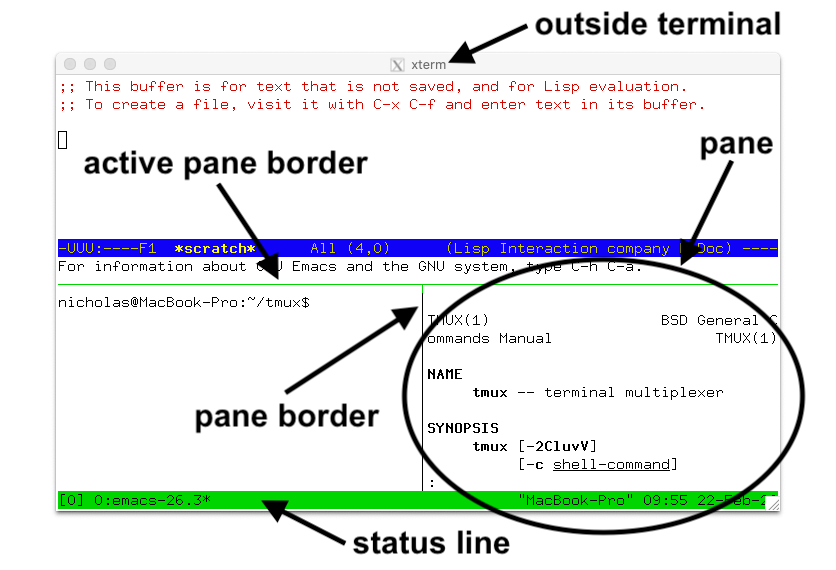
Server: A Tmux service for managing all sessions into it. Type
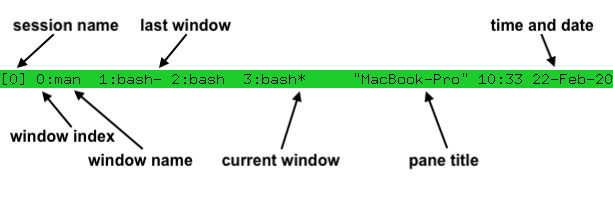
tmuxenable the service and run it.Session: A whole and complete working environment. Sessions are completely independent of each other. Keywords: create/ detach/ attach.
Window: windows are working under sessions. It is similar to the web browser’s tab.
Pane: Split one window into differnet parts.
All commands must use prefix + specific character. Ctrl + b is the common prefix in every system. Use C-b or P for short.
Sessions
tmux new-sesson
tmux new                #create a session with default name 0

tmux new -s work        # new named session -s: specified
tmux ls                 # list sessions

tmux a
tmux attach             # attach to the most recently used sessioin
tmux attach -t work     # reattach to the session named work
tmux kill-session -t work
tmux rename-window work # rename the current window
| Keys | Action |
|---|---|
P $ | rename the current session |
Detach from inside: P d.
Window
Create
Create a window must in a specific session
tmux new-window
tmux neww               #create a new window

tmux neww -d            # create a new window but doesn't make it the current window
tmux neww -n windowname # create a new window named windowname
tmux neww -t 999        #create a new window with index 999
Operations
| Keys | Action |
|---|---|
P & | kill the current window |
Panes
| Keys | Action |
|---|---|
prefix % | split vertically (left and right) |
prefix " | split horizontally (up and down) |
prefix arrow | move between panes |
prefix z | zoom / unzoom current pane |
prefix x | kill pane |
P * | create a floating pane |
P @ | change the current pane to the floating pane |
P up/down/left/right | move focus to other pane |
P m | mark the pane for swap |
P { or P } | rotate the pane/swap |
P space | modify the layout |
tmux swap-pane #swap the current pane with marked one
Choosing sessions, windows and panes
| Keys | Action |
|---|---|
P s | show the list of sessions into tree architecture |
P w | extend all contents into session list |
x | works in the tree view. Killing target window |
Copy mode
prefix [ to enter, q to quit. Vi keys if setw -g mode-keys vi.
Why bother
SSH into the lab box, start a long experiment inside tmux, close the laptop, reattach from anywhere. The experiment never notices.